核心问题
在配置 Web 服务器时,经常遇到以下静态资源相关的问题:
-
AVIF 图片在 Chrome 中直接访问会变成下载
- 原因:服务器没有正确返回
Content-Type: image/avif - 浏览器收到错误的 MIME 类型,就会触发下载
- 原因:服务器没有正确返回
-
Lighthouse 报警告
- “Use efficient cache lifetimes”
- 图片缓存时间过短(如 4h),影响性能评分
-
缓存策略不明确
- 不同类型资源应该设置多长缓存时间?
- 什么时候使用
immutable指令?
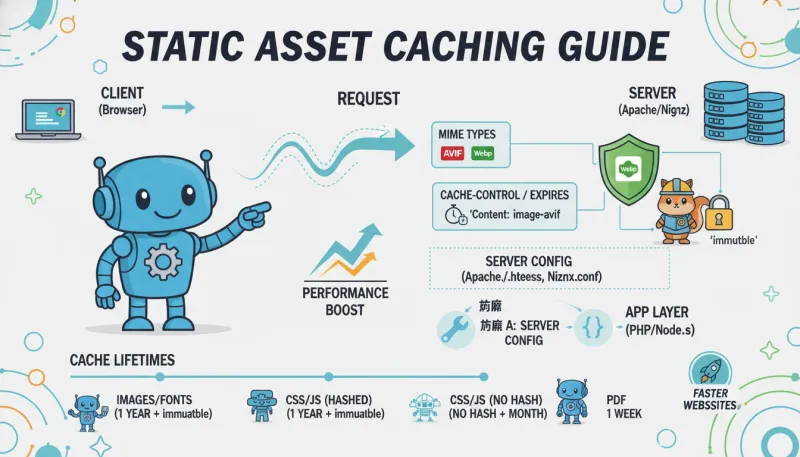
技术方案对比
配置静态资源缓存主要有两种方式:
方案 A:修改服务器配置文件(Apache/Nginx)
Apache/LiteSpeed (.htaccess)
- ✅ 服务器级别,性能最好
- ✅ 配置持久化,重启后仍有效
- ❌ 需要文件写入权限
- ❌ 只适用于 Apache/LiteSpeed 服务器
Nginx (nginx.conf)
- ✅ 服务器级别,性能最好
- ✅ 功能强大,支持复杂规则
- ❌ 需要手动编辑配置文件
- ❌ 修改后需要重载 Nginx
方案 B:应用层设置响应头(PHP/Node.js)
优点:
- ✅ 适用于所有服务器类型
- ✅ 可以动态判断资源类型
- ✅ 易于集成到应用代码中
缺点:
- ❌ 每次请求都要执行应用代码
- ❌ 性能不如服务器级别配置
- ❌ 只能影响通过应用处理的请求
选择建议:
- 优先使用方案 A(服务器配置),性能最优
- 方案 B 适合无法修改服务器配置的场景
缓存策略最佳实践
2025 年推荐配置
参考资料:
- Nitropack: How to Serve Static Assets With an Efficient Cache Policy
- KeyCDN: Cache-Control Immutable
- ShortPixel: AVIF MIME Type Delivery
核心原则:
-
缓存时间建议
- 图片/字体:1 年 +
immutable - CSS/JS(无版本号):1 个月
- CSS/JS(带 hash):1 年 +
immutable - PDF:1 周
- 图片/字体:1 年 +
-
immutable 指令的使用
- 适用于内容永不改变的资源
- 图片、字体通常不改,适合使用
- CSS/JS 需要根据文件名策略决定:
- 固定文件名(如
style.css):不用 immutable - 带版本号(如
style.v1.2.3.css):可以用 immutable - 带内容 hash(如
style.a7b3c2.css):建议用 immutable
- 固定文件名(如
-
MIME 类型配置
- Apache/Nginx 默认不认识 AVIF/WebP
- 必须手动添加
AddType声明 - 否则浏览器可能触发下载而非显示
Apache/LiteSpeed 配置示例
在网站根目录的 .htaccess 文件中添加:
apache
1234567891011121314151617181920212223242526272829303132333435363738394041424344454647484950515253545556
# MIME 类型声明(修复 AVIF/WebP 下载问题)
<IfModule mod_mime.c>
  AddType image/avif .avif
  AddType image/webp .webp
  AddType font/woff2 .woff2
</IfModule>

# 浏览器缓存(Expires)
<IfModule mod_expires.c>
  ExpiresActive On

  # 图片 - 1 年
  ExpiresByType image/avif "access plus 1 year"
  ExpiresByType image/webp "access plus 1 year"
  ExpiresByType image/jpeg "access plus 1 year"
  ExpiresByType image/png "access plus 1 year"
  ExpiresByType image/gif "access plus 1 year"
  ExpiresByType image/svg+xml "access plus 1 year"
  ExpiresByType image/x-icon "access plus 1 year"

  # 字体 - 1 年
  ExpiresByType font/woff2 "access plus 1 year"
  ExpiresByType font/woff "access plus 1 year"
  ExpiresByType font/ttf "access plus 1 year"
  ExpiresByType font/otf "access plus 1 year"

  # CSS/JS - 1 个月(适用于无版本号的文件)
  ExpiresByType text/css "access plus 1 month"
  ExpiresByType application/javascript "access plus 1 month"

  # PDF - 1 周
  ExpiresByType application/pdf "access plus 1 week"
</IfModule>

# Cache-Control 响应头(优化 Lighthouse 评分)
<IfModule mod_headers.c>
  # 图片 - immutable
  <FilesMatch "\.(avif|webp|jpe?g|png|gif|svg|ico)$">
    Header set Cache-Control "public, max-age=31536000, immutable"
  </FilesMatch>

  # 字体 - immutable
  <FilesMatch "\.(woff2?|ttf|otf)$">
    Header set Cache-Control "public, max-age=31536000, immutable"
  </FilesMatch>

  # CSS/JS - 无 immutable(适用于可能更新的文件)
  <FilesMatch "\.(css|js)$">
    Header set Cache-Control "public, max-age=2592000"
  </FilesMatch>

  # PDF
  <FilesMatch "\.pdf$">
    Header set Cache-Control "public, max-age=604800"
  </FilesMatch>
</IfModule>
Nginx 配置示例
在 nginx.conf 或站点配置文件中添加:
nginx
123456789101112131415161718192021222324252627
# MIME 类型声明
types {
    image/avif avif;
    image/webp webp;
    font/woff2 woff2;
}

# 静态资源缓存规则
location ~* \.(avif|webp|jpe?g|png|gif|svg|ico)$ {
    expires 1y;
    add_header Cache-Control "public, max-age=31536000, immutable";
}

location ~* \.(woff2?|ttf|otf)$ {
    expires 1y;
    add_header Cache-Control "public, max-age=31536000, immutable";
}

location ~* \.(css|js)$ {
    expires 1M;
    add_header Cache-Control "public, max-age=2592000";
}

location ~* \.pdf$ {
    expires 1w;
    add_header Cache-Control "public, max-age=604800";
}
配置后重载 Nginx:
bash
12
sudo nginx -t  # 测试配置
sudo systemctl reload nginx
PHP 运行时配置示例
如果无法修改服务器配置,可以在 PHP 中设置响应头:
php
123456789101112131415161718192021222324252627282930
function set_static_cache_headers() {
    $uri = $_SERVER['REQUEST_URI'];

    // 图片
    if (preg_match('/\.(avif|webp|jpe?g|png|gif|svg|ico)$/i', $uri)) {
        header('Cache-Control: public, max-age=31536000, immutable');
        header('Expires: ' . gmdate('D, d M Y H:i:s', time() + 31536000) . ' GMT');
    }

    // 字体
    elseif (preg_match('/\.(woff2?|ttf|otf)$/i', $uri)) {
        header('Cache-Control: public, max-age=31536000, immutable');
        header('Expires: ' . gmdate('D, d M Y H:i:s', time() + 31536000) . ' GMT');
    }

    // CSS/JS
    elseif (preg_match('/\.(css|js)$/i', $uri)) {
        header('Cache-Control: public, max-age=2592000');
        header('Expires: ' . gmdate('D, d M Y H:i:s', time() + 2592000) . ' GMT');
    }

    // PDF
    elseif (preg_match('/\.pdf$/i', $uri)) {
        header('Cache-Control: public, max-age=604800');
        header('Expires: ' . gmdate('D, d M Y H:i:s', time() + 604800) . ' GMT');
    }
}

// 在合适的钩子中调用
add_action('send_headers', 'set_static_cache_headers');注意: PHP 方案性能较差,建议仅作为兜底方案。
CDN 与源站缓存的关系
疑问: 如果使用了 CDN,源站的缓存配置还有用吗?
答案: 有用,而且很重要
-
CDN 会读取源站的 Cache-Control 头
- 源站配置是基础
- CDN 在此之上增强缓存策略
-
MIME 类型必须由源站配置
- CDN 不会修复 MIME 类型问题
- AVIF 下载问题必须在源站解决
-
直连源站的场景
- 用户绕过 CDN 访问时仍需缓存规则
- 某些 CDN 配置可能不缓存某些文件类型
- 开发测试环境通常不走 CDN
最佳实践: 源站配置 + CDN 配置 双重保障
常见问题与解决方案
问题 1: CSS/JS 缓存时间的权衡
场景: 固定文件名的 CSS/JS(如 style.css)
矛盾:
- 缓存时间太短:频繁请求,影响性能
- 缓存时间太长:更新后用户看不到新版本
解决方案:
-
使用版本号查询参数(推荐)
html12<link rel="stylesheet" href="style.css?v=1.2.3"> <script src="app.js?v=1.2.3"></script>- 更新版本号即可强制刷新
- 可以设置长缓存时间(1 年)
-
使用内容 hash(最佳)
html12<link rel="stylesheet" href="style.a7b3c2.css"> <script src="app.f4e9d1.js"></script>- Webpack/Vite 等构建工具自动生成
- 内容变化则 hash 变化,完美缓存
-
保守的中期缓存(兜底)
- 设置 1 个月缓存时间
- 平衡性能与更新频率
问题 2: .htaccess 文件权限不足
错误信息: Permission denied 或 Failed to write .htaccess
解决方案:
-
检查文件权限
bash12ls -la .htaccess chmod 644 .htaccess -
检查目录权限
bash12ls -la /path/to/webroot chmod 755 /path/to/webroot -
使用 FTP/SFTP 手动编辑
- 下载
.htaccess文件 - 本地编辑后上传
- 确保文件所有者正确
- 下载
问题 3: 配置后不生效
排查步骤:
-
清除浏览器缓存
- Chrome:
Ctrl+Shift+Delete或强制刷新Ctrl+F5 - 或使用隐私模式测试
- Chrome:
-
检查 Apache 模块是否启用
bash12345678910# 检查 mod_expires apachectl -M | grep expires # 检查 mod_headers apachectl -M | grep headers # 启用模块(如果未启用) sudo a2enmod expires sudo a2enmod headers sudo systemctl restart apache2 -
检查响应头
bash1curl -I https://example.com/image.avif应该看到:
plaintext123Cache-Control: public, max-age=31536000, immutable Expires: Thu, 28 Dec 2026 12:00:00 GMT Content-Type: image/avif -
检查配置是否被其他规则覆盖
-
.htaccess文件可能有多个 - 后面的规则可能覆盖前面的
-
验证配置效果
使用浏览器开发者工具
- 打开 Chrome DevTools (
F12) - 切换到 Network 标签
- 勾选 Disable cache(首次测试)
- 刷新页面,点击一个图片资源
- 查看 Response Headers:
-
Cache-Control: public, max-age=31536000, immutable -
Content-Type: image/avif
-
使用 Lighthouse
- 打开 Chrome DevTools
- 切换到 Lighthouse 标签
- 选择 Performance 类别
- 点击 Analyze page load
- 查看 “Serve static assets with an efficient cache policy” 项
- 应该显示绿色(通过)
- 如果是橙色/红色,说明缓存时间不足
使用命令行工具
bash
12345678
# 检查 Cache-Control 头
curl -I https://example.com/image.avif | grep -i cache

# 检查 Content-Type
curl -I https://example.com/image.avif | grep -i content-type

# 检查 Expires
curl -I https://example.com/image.avif | grep -i expires
参考资料
- Apache mod_expires Documentation
- Apache mod_headers Documentation
- Nginx ngx_http_headers_module
- MDN: Cache-Control
- Can I use AVIF
- RunCloud: Nginx Caching for WordPress
- Nginx Official: 9 Tips for Improving WordPress Performance
总结
静态资源缓存配置涉及多个知识点:
- MIME 类型配置 - 确保浏览器正确识别文件格式
- 缓存时间策略 - 平衡性能与更新频率
- immutable 指令 - 优化永不改变的资源
- 服务器配置 - Apache vs Nginx 差异
- CDN 协同 - 源站与 CDN 的关系
关键原则: 根据资源特性选择合适的缓存策略,优先使用服务器级别配置以获得最佳性能。