日期:2026-01-10 预计阅读时间:30 分钟
目录
一、什么是 tRPC?
1.1 问题背景
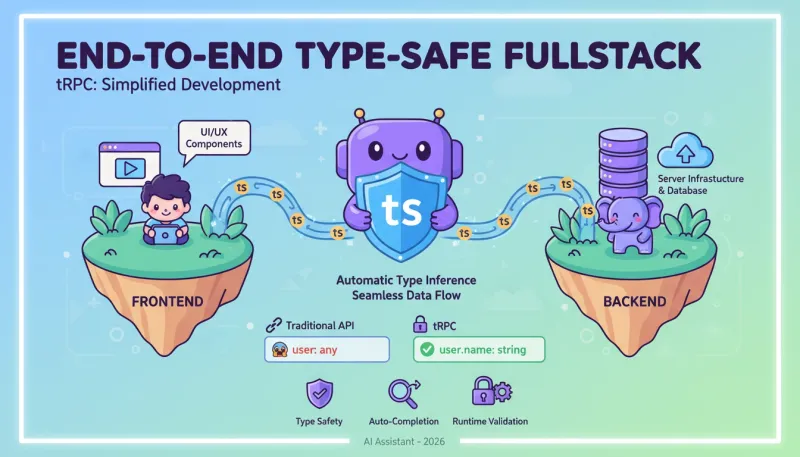
在传统的全栈开发中,前后端类型不一致是一个常见的痛点:
typescript
12345678910
// 后端 API (Express/Next.js)
app.get('/api/users/:id', async (req, res) => {
  const user = await db.getUser(req.params.id);
  res.json(user);
});

// 前端调用
const response = await fetch('/api/users/123');
const user = await response.json(); // user: any 😱
console.log(user.name); // 可能 undefined,运行时才知道问题:
- 前端不知道后端返回什么类型
- 后端改了字段,前端不会报错(运行时才炸)
- 需要手动维护两套类型定义
1.2 tRPC 的解决方案
tRPC = TypeScript Remote Procedure Call
让你像调用本地函数一样调用服务器函数,并且前后端类型完全同步。
typescript
123456789101112
// 后端定义
export const userRouter = router({
  getById: publicProcedure
    .input(z.object({ id: z.number() }))
    .query(async ({ input }) => {
      return await db.getUser(input.id);
    }),
});

// 前端调用(自动类型推断)
const user = await trpc.user.getById.query({ id: 123 });
console.log(user.name); // ✅ TypeScript 知道 user 有 name 属性核心价值:
- ✅ 端到端类型安全:后端改了,前端立刻报错
- ✅ 自动类型推断:无需手动定义前端类型
- ✅ 运行时验证:Zod 自动验证输入参数
- ✅ 自动序列化:Date/BigInt 等特殊类型自动处理
二、核心概念
2.1 Procedure(过程)
Procedure = 一个可远程调用的函数
tRPC 有两种 Procedure:
- Query:只读操作(GET 请求)
- Mutation:写入操作(POST/PUT/DELETE 请求)
typescript
123456789101112131415
// Query:查询数据(幂等)
export const todoRouter = router({
  list: publicProcedure.query(async () => {
    return await db.todos.findMany();
  }),
});

// Mutation:修改数据(非幂等)
export const todoRouter = router({
  create: publicProcedure
    .input(z.object({ title: z.string() }))
    .mutation(async ({ input }) => {
      return await db.todos.create({ data: input });
    }),
});
2.2 Router(路由器)
Router = 一组 Procedures 的集合
typescript
123456789101112131415161718192021
// 定义多个 Router
const userRouter = router({
  list: publicProcedure.query(...),
  getById: publicProcedure.query(...),
  create: publicProcedure.mutation(...),
});

const postRouter = router({
  list: publicProcedure.query(...),
  create: publicProcedure.mutation(...),
});

// 组合成根 Router
export const appRouter = router({
  user: userRouter,
  post: postRouter,
});

// 前端调用
trpc.user.list.useQuery();
trpc.post.create.useMutation();
2.3 Context(上下文)
Context = 每个 Procedure 都能访问的共享数据
typescript
1234567891011121314151617181920
// 定义 Context
const createContext = async (opts: CreateNextContextOptions) => {
  const session = await getSession(opts.req);

  return {
    session,        // 当前会话
    db,             // 数据库连接
    headers: opts.req.headers,
  };
};

// 在 Procedure 中使用
export const userRouter = router({
  getMe: publicProcedure.query(async ({ ctx }) => {
    if (!ctx.session) throw new Error('Unauthorized');
    return await ctx.db.users.findUnique({
      where: { id: ctx.session.userId },
    });
  }),
});
2.4 Middleware(中间件)
Middleware = 在 Procedure 执行前后执行的逻辑
typescript
123456789101112131415161718192021222324252627
// 定义认证中间件
const isAuthenticated = t.middleware(async ({ ctx, next }) => {
  if (!ctx.session) {
    throw new TRPCError({ code: 'UNAUTHORIZED' });
  }
  return next({
    ctx: {
      session: ctx.session, // 确保 session 存在
    },
  });
});

// 创建需要认证的 Procedure
const protectedProcedure = t.procedure.use(isAuthenticated);

// 使用
export const userRouter = router({
  updateProfile: protectedProcedure
    .input(z.object({ name: z.string() }))
    .mutation(async ({ input, ctx }) => {
      // ctx.session 一定存在(中间件已检查)
      return await db.users.update({
        where: { id: ctx.session.userId },
        data: input,
      });
    }),
});
2.5 Input/Output Schema(Zod 验证)
Input Schema = 定义并验证输入参数
typescript
12345678910111213141516171819202122232425262728
// 定义 Schema
const createPostSchema = z.object({
  title: z.string().min(1, '标题不能为空'),
  content: z.string().min(10, '内容至少 10 个字符'),
  published: z.boolean().default(false),
  tags: z.array(z.string()).max(5, '最多 5 个标签'),
});

// 使用
export const postRouter = router({
  create: publicProcedure
    .input(createPostSchema)
    .mutation(async ({ input }) => {
      // input 类型自动推断为:
      // { title: string, content: string, published: boolean, tags: string[] }

      return await db.posts.create({ data: input });
    }),
});

// 前端调用
trpc.post.create.mutate({
  title: '我的第一篇文章',
  content: '这是内容...',
  tags: ['技术', 'TypeScript'],
});
// ✅ TypeScript 自动检查类型
// ✅ Zod 运行时验证(如果 title 为空会报错)
三、快速开始
3.1 安装依赖
bash
1
npm install @trpc/server @trpc/client @trpc/react-query @tanstack/react-query zod superjson3.2 后端:初始化 tRPC
typescript
1234567891011121314151617181920212223242526272829303132333435363738
// src/server/trpc.ts
import { initTRPC, TRPCError } from '@trpc/server';
import superjson from 'superjson';

// 1. 定义 Context 类型
type Context = {
  userId?: string;
};

// 2. 创建 Context
export const createContext = async (opts: { req: Request }) => {
  const token = opts.req.headers.get('authorization');
  const userId = token ? await verifyToken(token) : undefined;

  return { userId };
};

// 3. 初始化 tRPC
const t = initTRPC.context<Context>().create({
  transformer: superjson, // 自动处理 Date/BigInt
  errorFormatter({ shape }) {
    return shape;
  },
});

// 4. 导出工具函数
export const router = t.router;
export const publicProcedure = t.procedure;

// 5. 创建认证中间件
const isAuthenticated = t.middleware(({ ctx, next }) => {
  if (!ctx.userId) {
    throw new TRPCError({ code: 'UNAUTHORIZED' });
  }
  return next({ ctx: { userId: ctx.userId } });
});

export const protectedProcedure = t.procedure.use(isAuthenticated);
3.3 后端:定义 Router
typescript
123456789101112131415161718192021222324252627282930313233343536373839404142434445464748495051525354555657
// src/server/routers/todo.ts
import { z } from 'zod';
import { router, publicProcedure, protectedProcedure } from '../trpc';

export const todoRouter = router({
  // 查询所有 todo
  list: publicProcedure.query(async () => {
    return await db.todos.findMany();
  }),

  // 根据 ID 查询
  getById: publicProcedure
    .input(z.object({ id: z.number() }))
    .query(async ({ input }) => {
      return await db.todos.findUnique({
        where: { id: input.id },
      });
    }),

  // 创建 todo(需要登录)
  create: protectedProcedure
    .input(z.object({
      title: z.string().min(1),
      completed: z.boolean().default(false),
    }))
    .mutation(async ({ input, ctx }) => {
      return await db.todos.create({
        data: {
          ...input,
          userId: ctx.userId,
        },
      });
    }),

  // 更新 todo
  update: protectedProcedure
    .input(z.object({
      id: z.number(),
      title: z.string().optional(),
      completed: z.boolean().optional(),
    }))
    .mutation(async ({ input, ctx }) => {
      return await db.todos.update({
        where: { id: input.id, userId: ctx.userId },
        data: input,
      });
    }),

  // 删除 todo
  delete: protectedProcedure
    .input(z.object({ id: z.number() }))
    .mutation(async ({ input, ctx }) => {
      return await db.todos.delete({
        where: { id: input.id, userId: ctx.userId },
      });
    }),
});
typescript
123456789
// src/server/routers/_app.ts
import { router } from '../trpc';
import { todoRouter } from './todo';

export const appRouter = router({
  todo: todoRouter,
});

export type AppRouter = typeof appRouter; // ⚠️ 重要:导出类型
3.4 后端:HTTP 适配器(Next.js)
typescript
1234567891011121314
// src/app/api/trpc/[trpc]/route.ts
import { fetchRequestHandler } from '@trpc/server/adapters/fetch';
import { appRouter } from '@/server/routers/_app';
import { createContext } from '@/server/trpc';

const handler = (req: Request) =>
  fetchRequestHandler({
    endpoint: '/api/trpc',
    req,
    router: appRouter,
    createContext,
  });

export { handler as GET, handler as POST };
3.5 前端:配置客户端
typescript
12345
// src/utils/trpc.ts
import { createTRPCReact } from '@trpc/react-query';
import type { AppRouter } from '@/server/routers/_app';

export const trpc = createTRPCReact<AppRouter>();
typescript
12345678910111213141516171819202122232425262728293031323334
// src/app/_providers.tsx
'use client';

import { QueryClient, QueryClientProvider } from '@tanstack/react-query';
import { httpBatchLink } from '@trpc/client';
import { useState } from 'react';
import superjson from 'superjson';
import { trpc } from '@/utils/trpc';

export function TRPCProvider({ children }: { children: React.ReactNode }) {
  const [queryClient] = useState(() => new QueryClient());
  const [trpcClient] = useState(() =>
    trpc.createClient({
      links: [
        httpBatchLink({
          url: '/api/trpc',
          transformer: superjson, // 必须与后端一致
          headers() {
            const token = localStorage.getItem('token');
            return token ? { authorization: `Bearer ${token}` } : {};
          },
        }),
      ],
    }),
  );

  return (
    <trpc.Provider client={trpcClient} queryClient={queryClient}>
      <QueryClientProvider client={queryClient}>
        {children}
      </QueryClientProvider>
    </trpc.Provider>
  );
}
3.6 前端:使用 tRPC
typescript
12345678910111213141516171819202122232425262728293031323334353637383940414243444546474849505152535455565758596061626364656667686970
// src/app/todos/page.tsx
'use client';

import { trpc } from '@/utils/trpc';

export default function TodosPage() {
  // 查询列表
  const { data: todos, isLoading } = trpc.todo.list.useQuery();

  // 创建 todo
  const utils = trpc.useUtils();
  const createMutation = trpc.todo.create.useMutation({
    onSuccess: () => {
      utils.todo.list.invalidate(); // 刷新列表
    },
  });

  // 更新 todo
  const updateMutation = trpc.todo.update.useMutation({
    onSuccess: () => {
      utils.todo.list.invalidate();
    },
  });

  // 删除 todo
  const deleteMutation = trpc.todo.delete.useMutation({
    onSuccess: () => {
      utils.todo.list.invalidate();
    },
  });

  const handleCreate = () => {
    createMutation.mutate({
      title: '新任务',
      completed: false,
    });
  };

  const handleToggle = (id: number, completed: boolean) => {
    updateMutation.mutate({
      id,
      completed: !completed,
    });
  };

  const handleDelete = (id: number) => {
    deleteMutation.mutate({ id });
  };

  if (isLoading) return <div>加载中...</div>;

  return (
    <div>
      <button onClick={handleCreate}>新建任务</button>
      <ul>
        {todos?.map((todo) => (
          <li key={todo.id}>
            <input
              type="checkbox"
              checked={todo.completed}
              onChange={() => handleToggle(todo.id, todo.completed)}
            />
            <span>{todo.title}</span>
            <button onClick={() => handleDelete(todo.id)}>删除</button>
          </li>
        ))}
      </ul>
    </div>
  );
}
四、深入理解
4.1 类型推断原理
typescript
123456789101112131415161718192021222324252627
// 1. 后端定义
export const appRouter = router({
  todo: router({
    getById: publicProcedure
      .input(z.object({ id: z.number() }))
      .query(async ({ input }) => {
        return { id: input.id, title: '示例任务', completed: false };
      }),
  }),
});

// TypeScript 自动推断 appRouter 的类型:
type AppRouter = {
  todo: {
    getById: {
      input: { id: number };
      output: { id: number; title: string; completed: boolean };
    };
  };
};

// 2. 前端创建客户端
export const trpc = createTRPCReact<AppRouter>();

// 3. 调用时自动推断
const todo = await trpc.todo.getById.query({ id: 123 });
// todo: { id: number; title: string; completed: boolean }
4.2 HTTP 请求格式
typescript
12345678910111213141516171819202122232425262728
// tRPC 底层仍然是 HTTP,只是格式不同

// RESTful 请求:
POST /api/todos
Content-Type: application/json
{ "title": "买菜", "completed": false }

// tRPC 请求(不使用 batch):
POST /api/trpc/todo.create
Content-Type: application/json
{
  "json": { "title": "买菜", "completed": false },
  "meta": { "values": {} } // superjson 元数据
}

// tRPC 批量请求(使用 httpBatchLink):
POST /api/trpc
Content-Type: application/json
{
  "0": {
    "json": { "id": 123 },
    "meta": { "values": {} }
  },
  "1": {
    "json": { "title": "买菜" },
    "meta": { "values": {} }
  }
}
4.3 superjson 序列化
问题:JavaScript 的 JSON.stringify 无法处理特殊类型。
typescript
1234567
// 普通 JSON 的问题
const data = { createdAt: new Date('2025-01-01') };
JSON.stringify(data);
// → '{"createdAt":"2025-01-01T00:00:00.000Z"}' (字符串)

JSON.parse('{"createdAt":"2025-01-01T00:00:00.000Z"}');
// → { createdAt: "2025-01-01T00:00:00.000Z" } (仍是字符串,不是 Date)
superjson 的解决方案:
typescript
123456789
import superjson from 'superjson';

const data = { createdAt: new Date('2025-01-01') };
const serialized = superjson.stringify(data);
// → '{"json":{"createdAt":"2025-01-01T00:00:00.000Z"},"meta":{"values":{"createdAt":["Date"]}}}'

const deserialized = superjson.parse(serialized);
// → { createdAt: Date 对象 } ✅
console.log(deserialized.createdAt instanceof Date); // true支持的类型:
-
Date -
undefined -
BigInt -
Map/Set -
RegExp -
Error - 循环引用
4.4 错误处理
typescript
12345678910111213141516171819202122232425
// 后端抛出错误
export const todoRouter = router({
  getById: publicProcedure
    .input(z.object({ id: z.number() }))
    .query(async ({ input }) => {
      const todo = await db.todos.findUnique({ where: { id: input.id } });

      if (!todo) {
        throw new TRPCError({
          code: 'NOT_FOUND',
          message: '任务不存在',
        });
      }

      return todo;
    }),
});

// 前端捕获错误
const { data, error } = trpc.todo.getById.useQuery({ id: 999 });

if (error) {
  console.log(error.message); // "任务不存在"
  console.log(error.data?.code); // "NOT_FOUND"
}
tRPC 错误码:
-
UNAUTHORIZED- 401 -
FORBIDDEN- 403 -
NOT_FOUND- 404 -
TIMEOUT- 408 -
CONFLICT- 409 -
INTERNAL_SERVER_ERROR- 500 -
BAD_REQUEST- 400
五、高级用法
5.1 订阅(Subscription)
typescript
1234567891011121314151617181920212223
// 后端:定义订阅
export const todoRouter = router({
  onUpdate: publicProcedure.subscription(async function* () {
    const eventEmitter = new EventEmitter();

    // 监听数据库变化
    db.todos.on('update', (todo) => {
      eventEmitter.emit('update', todo);
    });

    // 推送数据
    for await (const data of eventEmitter) {
      yield data;
    }
  }),
});

// 前端:订阅数据
trpc.todo.onUpdate.useSubscription(undefined, {
  onData(todo) {
    console.log('收到更新:', todo);
  },
});
5.2 服务端调用(SSR)
typescript
123456789101112131415
// Next.js App Router 中使用
import { createCaller } from '@/server/trpc';

export default async function TodosPage() {
  const caller = createCaller({});
  const todos = await caller.todo.list(); // 服务端直接调用

  return (
    <ul>
      {todos.map((todo) => (
        <li key={todo.id}>{todo.title}</li>
      ))}
    </ul>
  );
}
5.3 条件查询
typescript
12345
// 根据条件决定是否查询
const { data } = trpc.todo.getById.useQuery(
  { id: todoId },
  { enabled: !!todoId } // 只有 todoId 存在时才查询
);
5.4 乐观更新
typescript
123456789101112131415161718192021222324
const updateMutation = trpc.todo.update.useMutation({
  onMutate: async (newTodo) => {
    // 取消正在进行的查询
    await utils.todo.list.cancel();

    // 保存旧数据(用于回滚)
    const previousTodos = utils.todo.list.getData();

    // 乐观更新
    utils.todo.list.setData(undefined, (old) =>
      old?.map((t) => (t.id === newTodo.id ? { ...t, ...newTodo } : t))
    );

    return { previousTodos };
  },
  onError: (err, newTodo, context) => {
    // 回滚
    utils.todo.list.setData(undefined, context?.previousTodos);
  },
  onSettled: () => {
    // 重新获取数据
    utils.todo.list.invalidate();
  },
});
5.5 中间件链
typescript
1234567891011121314151617181920212223
// 定义多个中间件
const timing = t.middleware(async ({ next, path }) => {
  const start = Date.now();
  const result = await next();
  console.log(`${path} took ${Date.now() - start}ms`);
  return result;
});

const logging = t.middleware(async ({ next, path, input }) => {
  console.log(`Calling ${path} with input:`, input);
  return next();
});

const isAuthenticated = t.middleware(async ({ ctx, next }) => {
  if (!ctx.userId) throw new TRPCError({ code: 'UNAUTHORIZED' });
  return next({ ctx: { userId: ctx.userId } });
});

// 组合中间件
const protectedProcedure = t.procedure
  .use(timing)
  .use(logging)
  .use(isAuthenticated);
六、最佳实践
6.1 Router 组织结构
plaintext
1234567891011121314
src/server/
├── trpc.ts              # tRPC 初始化
├── routers/
│   ├── _app.ts          # 根 router
│   ├── user.ts          # 用户相关
│   ├── post.ts          # 文章相关
│   ├── comment.ts       # 评论相关
│   └── admin/           # 管理员模块
│       ├── index.ts
│       ├── user.ts
│       └── analytics.ts
└── utils/
    ├── auth.ts          # 认证工具
    └── validation.ts    # 验证工具
6.2 Zod Schema 复用
typescript
123456789101112131415161718192021
// shared/schemas/user.ts
export const userSchema = z.object({
  id: z.number(),
  email: z.string().email(),
  name: z.string().min(1),
  createdAt: z.date(),
});

export const createUserSchema = userSchema.omit({ id: true, createdAt: true });
export const updateUserSchema = userSchema.partial().required({ id: true });

// 使用
export const userRouter = router({
  create: publicProcedure
    .input(createUserSchema)
    .mutation(async ({ input }) => { ... }),

  update: publicProcedure
    .input(updateUserSchema)
    .mutation(async ({ input }) => { ... }),
});
6.3 Context 类型安全
typescript
123456789101112131415161718192021222324252627
// 定义多种 Context
type BaseContext = {
  db: Database;
};

type AuthenticatedContext = BaseContext & {
  userId: string;
};

// 中间件保证类型
const isAuthenticated = t.middleware(async ({ ctx, next }) => {
  if (!ctx.userId) throw new TRPCError({ code: 'UNAUTHORIZED' });

  return next({
    ctx: ctx as AuthenticatedContext, // 类型断言
  });
});

// 使用
const protectedProcedure = t.procedure.use(isAuthenticated);

export const userRouter = router({
  getMe: protectedProcedure.query(async ({ ctx }) => {
    // ctx.userId 类型为 string(不是 string | undefined)
    return await ctx.db.users.findUnique({ where: { id: ctx.userId } });
  }),
});
6.4 错误处理统一化
typescript
1234567891011121314151617181920212223242526272829
// utils/errors.ts
export class AppError extends TRPCError {
  constructor(message: string, code: TRPC_ERROR_CODE_KEY = 'INTERNAL_SERVER_ERROR') {
    super({ code, message });
  }
}

export class NotFoundError extends AppError {
  constructor(resource: string) {
    super(`${resource} not found`, 'NOT_FOUND');
  }
}

export class ValidationError extends AppError {
  constructor(message: string) {
    super(message, 'BAD_REQUEST');
  }
}

// 使用
export const todoRouter = router({
  getById: publicProcedure
    .input(z.object({ id: z.number() }))
    .query(async ({ input }) => {
      const todo = await db.todos.findUnique({ where: { id: input.id } });
      if (!todo) throw new NotFoundError('Todo');
      return todo;
    }),
});
6.5 性能优化
typescript
12345678910111213141516171819202122232425262728293031
// 1. 使用 dataloader 避免 N+1 查询
import DataLoader from 'dataloader';

const createContext = async () => {
  const userLoader = new DataLoader(async (ids: number[]) => {
    const users = await db.users.findMany({ where: { id: { in: ids } } });
    return ids.map((id) => users.find((u) => u.id === id));
  });

  return { userLoader };
};

// 2. 使用 httpBatchLink 批量请求
const trpcClient = trpc.createClient({
  links: [
    httpBatchLink({
      url: '/api/trpc',
      maxURLLength: 2083, // 避免 URL 过长
    }),
  ],
});

// 3. 前端缓存配置
const queryClient = new QueryClient({
  defaultOptions: {
    queries: {
      staleTime: 60 * 1000, // 1 分钟内不重新请求
      cacheTime: 5 * 60 * 1000, // 缓存 5 分钟
    },
  },
});
七、常见问题
Q1: tRPC 支持文件上传吗?
A: 不直接支持。需要保留 RESTful 端点。
typescript
123456789
// REST API 上传文件
POST /api/upload
Content-Type: multipart/form-data

// tRPC 只传文件 URL
trpc.post.create.mutate({
  title: '文章标题',
  coverImage: 'https://cdn.example.com/image.jpg', // 上传后的 URL
});
Q2: 如何调试 tRPC 请求?
A: 浏览器 DevTools Network 面板。
plaintext
12345678910111213141516
请求路径:/api/trpc/todo.list
请求体:
{
  "json": {},
  "meta": { "values": {} }
}

响应:
{
  "result": {
    "data": {
      "json": [ ... ],
      "meta": { "values": {} }
    }
  }
}
Q3: tRPC 与 GraphQL 的区别?
| 维度 | tRPC | GraphQL |
|---|---|---|
| 类型系统 | TypeScript | Schema 定义语言 |
| 代码生成 | 不需要 | 需要 |
| 学习曲线 | 低(纯 TS) | 高(新语言) |
| 灵活性 | 低(固定结构) | 高(查询任意字段) |
| 生态 | 新兴 | 成熟 |
| 适用场景 | 全栈 TS 项目 | 大型 API + 多端 |
Q4: 生产环境性能如何?
superjson 性能开销:
- 序列化:比 JSON 慢 50%
- 反序列化:比 JSON 慢 30%
建议:
- 小数据量(少于 1000 条):可忽略
- 大数据量(超过 5000 条):考虑 RESTful
Q5: 如何处理 CORS?
typescript
1234567891011
// Next.js App Router 中设置 CORS
export async function OPTIONS() {
  return new Response(null, {
    status: 200,
    headers: {
      'Access-Control-Allow-Origin': '*',
      'Access-Control-Allow-Methods': 'GET, POST, OPTIONS',
      'Access-Control-Allow-Headers': 'Content-Type, Authorization',
    },
  });
}
Q6: 外部系统如何调用 tRPC API?
不推荐。tRPC 设计用于内部 API,外部调用应该用 RESTful。
混合方案:
typescript
12345
// 内部调用:tRPC
trpc.todo.list.useQuery();

// 外部调用:RESTful
GET /api/todos
Q7: tRPC 支持 WebSocket 吗?
支持,但需要配置 wsLink。
typescript
123456789
import { wsLink } from '@trpc/client';

const trpcClient = trpc.createClient({
  links: [
    wsLink({
      url: 'ws://localhost:3000/api/trpc',
    }),
  ],
});
Q8: 如何测试 tRPC API?
typescript
1234567891011121314
import { createCaller } from '@/server/trpc';

describe('todoRouter', () => {
  it('should create todo', async () => {
    const caller = createCaller({ userId: '123' });

    const todo = await caller.todo.create({
      title: '测试任务',
      completed: false,
    });

    expect(todo.title).toBe('测试任务');
  });
});
八、总结
8.1 tRPC 的核心价值
-
端到端类型安全
- 后端改了,前端立刻知道
- 编译时发现错误,不是运行时
-
自动化
- 类型自动推断
- 序列化自动处理
- 错误处理统一
-
开发体验
- IDE 自动补全
- 重构友好
- 减少手动代码
8.2 适用场景
✅ 适合使用 tRPC:
- 全栈 TypeScript 项目
- 同一个 monorepo
- 内部 API(不对外)
- 快速迭代
❌ 不适合使用 tRPC:
- 公开 API(外部调用)
- 大数据量传输(超过 5000 条)
- 文件上传
- 非 TypeScript 客户端
8.3 学习路径
- 第 1 天:理解核心概念(Procedure/Router/Context)
- 第 2 天:搭建完整的 Demo(Todo App)
- 第 3 天:学习高级用法(Middleware/Subscription)
- 第 4 天:实践项目集成
8.4 参考资源
- 官方文档:https://trpc.io/
- GitHub:https://github.com/trpc/trpc
- 示例项目:https://github.com/trpc/examples-next-prisma-starter
- 视频教程:https://www.youtube.com/c/trpc
最后更新:2026-01-10 作者:AI Assistant License: MIT
附录:完整示例代码
A. 后端完整代码
typescript
12345678910111213141516171819202122232425
// src/server/trpc.ts
import { initTRPC, TRPCError } from '@trpc/server';
import superjson from 'superjson';

type Context = { userId?: string };

export const createContext = async (opts: { req: Request }) => {
  const token = opts.req.headers.get('authorization');
  const userId = token ? await verifyToken(token) : undefined;
  return { userId };
};

const t = initTRPC.context<Context>().create({
  transformer: superjson,
});

export const router = t.router;
export const publicProcedure = t.procedure;

const isAuthenticated = t.middleware(({ ctx, next }) => {
  if (!ctx.userId) throw new TRPCError({ code: 'UNAUTHORIZED' });
  return next({ ctx: { userId: ctx.userId } });
});

export const protectedProcedure = t.procedure.use(isAuthenticated);
typescript
1234567891011121314151617181920
// src/server/routers/todo.ts
import { z } from 'zod';
import { router, publicProcedure, protectedProcedure } from '../trpc';

export const todoRouter = router({
  list: publicProcedure.query(async () => {
    return await db.todos.findMany();
  }),

  create: protectedProcedure
    .input(z.object({
      title: z.string().min(1),
      completed: z.boolean().default(false),
    }))
    .mutation(async ({ input, ctx }) => {
      return await db.todos.create({
        data: { ...input, userId: ctx.userId },
      });
    }),
});
B. 前端完整代码
typescript
12345
// src/utils/trpc.ts
import { createTRPCReact } from '@trpc/react-query';
import type { AppRouter } from '@/server/routers/_app';

export const trpc = createTRPCReact<AppRouter>();
typescript
12345678910111213141516171819202122
// src/app/todos/page.tsx
'use client';

import { trpc } from '@/utils/trpc';

export default function TodosPage() {
  const { data: todos } = trpc.todo.list.useQuery();
  const createMutation = trpc.todo.create.useMutation();

  return (
    <div>
      <button onClick={() => createMutation.mutate({ title: '新任务' })}>
        新建
      </button>
      <ul>
        {todos?.map((todo) => (
          <li key={todo.id}>{todo.title}</li>
        ))}
      </ul>
    </div>
  );
}
Happy Coding! 🚀